



FDC is a tool for writing images back to a floppy disc for use with an 8-bit computer
| COMMAND | FUNCTION |
|---|---|
| fd0, fd1 | Select drive A or B |
| bbc, bbc80, bbc640 | ssd, dsd, adf |
| format0, format1 | Format drive A or B |
| write0, write1 [filename] | Write selected file to A or B |
To use FDC, I would recommend creating a Win 98SE Boot Disk and adding additional CD-ROM drivers if required (SATA, USB, etc)
Create the boot disk, and also a CD containing FDC and all the images that you wish to write to disk
Boot into DOS using the disk and run FDC from the CD. Don't forget to remove the boot disk and insert a fresh floppy for writing!

FreeUEF is a tool for releasing tape data stored in UEF files.
It has the ability to output via your soundcard, or to convert the data
to a wav file for use in a media player
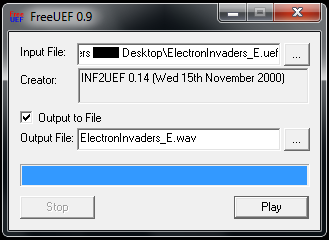
Select your source by clicking the button next to 'Input File' and locate the UEF that you wish to convert. Alternatively, you can drag and drop a UEF file onto the window. If you wish to output the UEF through your computer speakers or sound output then click 'Play'. To convert to a wav file then check the 'Output to File' box and select a target output filename, including the .wav extension, by clicking the button next to 'Output file'. FreeUEF outputs mono 8bit audio at 44100Hz

